QuickWheel
A downloadable tool for Windows
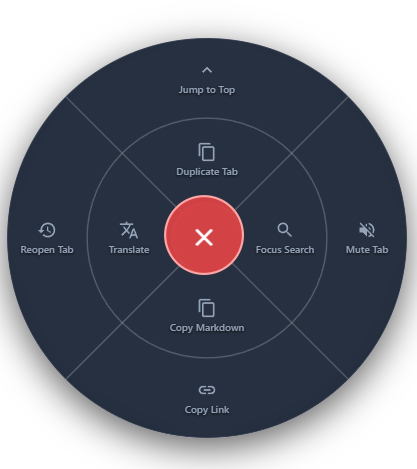
QuickWheel is a dual ring radial mouse gesture menu triggered by holding middle click. Designed for power users, it lowers the friction of daily browsing with 8 instant flicks!
Created and developed by Janis Flury (aka Frog1230).
- 🌐 Portfolio:
- Frog1230 Portfolio
- 💻 Source Code:
- GitHub Repository
- More Of My Work:
- MindShield
- Content Chef
- Remind Me
Key Features & Gestures
Simply hold the middle mouse button anywhere on a page to summon a sleek, dark mode radial menu directly under your cursor.
Inner Ring Gestures (Close Flicks):
- Duplicate Tab (UP): Instantly clone your active tab without right clicking tab headers.
- Focus Search (RIGHT): Automatically finds and focuses search bars across Reddit, YouTube, X, Wikipedia, and complex Web Components.
- Copy Markdown (BOTTOM): Copies selected text as a blockquote with a formatted page link for Notion, Obsidian, Discord, or GitHub.
- Translate Page (LEFT): Translates webpage text in place under the hood without opening extra tabs.
Outer Ring Gestures (Far Flicks):
- Jump to Top (UP): Smoothly scrolls straight back to the top of long feeds.
- Mute / Unmute Tab (RIGHT): Silences noisy media tabs directly from anywhere on the screen.
- Copy Link (BOTTOM): Copies the plain page URL directly to your clipboard.
- Reopen Tab (LEFT): Instantly restores your last closed tab.
Why QuickWheel?
- Preserves Native Autoscroll: Quick middle clicks (<150ms) still trigger your browser's native middle click autoscroll normally.
- Frictionless Navigation: Page scrolling automatically locks during gestures, and your cursor transforms into a smooth pointer.
- Isolated Shadow DOM UI: Encapsulated styling ensures web page stylesheets never break the radial menu layout.
- 100% Private: Operates entirely on your device with zero data collection, analytics, or external tracking.
Privacy Policy
- Privacy First: QuickWheel operates entirely on your local device. This extension does not transmit, collect, store, or sell any of your personal data or browsing activity.
Disclaimer
The software is provided "as is" the developer is not liable for any issues that might be caused.
Download
Install instructions
- Download the QuickWheel.zip file for Chrome/Chromium or QuickWheel Firefox.zip for Firefox.
- Extract the ZIP file to a folder on your computer.
- Chrome: Navigate to
chrome://extensions/->Enable Developer mode (top right) -> Click Load unpacked (top left) and select the extracted folder.
- Firefox: Navigate to
about:debugging#/runtime/this-firefox-> Click Load Temporary Add-on... and selectmanifest.json.
Development log
- QuickWheel: Launch9 hours ago
Leave a comment
Log in with itch.io to leave a comment.