Content Chef
A downloadable tool
Stop seeing unwanted AI content and more on YT simply with the content chef extension.
What is content chef? It is a youtube content filter extension.
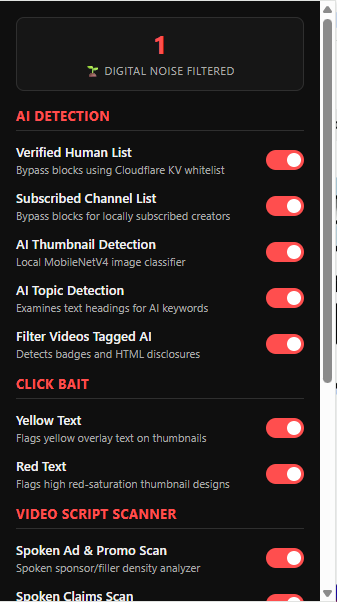
Content chef will cook up your feed to your liking, creating nicer experience. The menu offers options of your choosing with just a simple flick of a button. AI filter Options are a verified human list, AI callout in comments, AI thumbnail detection, AI topic detection, filter videos that are tagged as AI. The verified human list includes channels that are very likely to be human produced. The AI callout detector is shorts only it looks for high ranking comments calling out AI. The AI thumbnail detection uses a small local image reader AI to check for AI thumbnails though its aggressive and will get some false positives. AI topic detection will flag any video mentioning AI names, models, agents. The AI tag filter looks for AI tags and badges inside inside the metadata. Other scanners are also included that also help flag AI videos by flagging elements AI videos use. These other scanners are click bait flagging big yellow and red text. The video transcript scanner checks for dragged out videos and conspiracy videos.
Terms Of Serves: Privacy: Content Chef is a privacy-first tool. All data, settings, and filtering logic are stored exclusively on your local device. This extension does not transmit, collect, store, or sell any of your personal data or browsing activity to any servers.
Disclaimer: By using this tool you acknowledge you are the one choosing to filter videos and understand there may be false flagged content by the software. The software is provided ""as is" the developer is not liable for any issues that might be caused.
Download
Install instructions
- Download the extension ZIP file and extract it to a folder on your computer.
- Open Chrome and navigate to chrome://extensions/.
- Toggle Developer mode to ON in the top right corner.
- Click Load unpacked in the top left.
- Select the folder where you extracted the extension files.
Development log
- Content Chef Release9 hours ago
Leave a comment
Log in with itch.io to leave a comment.